
exosim.utils.binning#
Attributes#
Functions#
|
This function can resample multidimensional array along a given axis. |
Module Contents#
- rebin(x, xp, fp, axis=0, mode='mean', fill_value=0.0)[source]#
This function can resample multidimensional array along a given axis. Resample a function fp(xp) over the new grid x, rebinning if necessary, otherwise interpolates. Interpolation is done using ‘linear’ method. This function doesn’t perform extrapolation: unsample coordinates will be filled with filled value.
- Parameters:
x (
ndarray) – New coordinatesfp (
ndarray) – y-coordinates to be resampledxp (
ndarray) – x-coordinates at which fp are sampledaxis (int (optional)) – fp axis to resample. Default is 0.
mode (str (optional)) – the mode indicates the statistc to use for binning by
scipy.stats.binned_statistic. Default is ‘mean’.fill_value (float or str (optional)) – fill value for unsampled coordinates. Default is 0.0.
- Returns:
re-sampled fp
- Return type:
- Raises:
NotImplementedError – If the mode is not implemented.
Examples
>>> import numpy as np
>>> from exosim.utils.binning import rebin
We define the original function, sampled in data 50 points:
>>> xp = np.linspace(1,10, 50)
>>> fp = np.sin(xp)
We bin it down, sampling it at 10 points
>>> x_bin = np.linspace(1,10, 10)
>>> f_bin = rebin(x_bin, xp, fp)
We wl_interpolate the original function, sampling it at 100 points
>>> x_inter = np.linspace(1,10, 100)
>>> f_inter = rebin(x_inter, xp, fp)
To compare the outcome of our interpolation, we produce a plot.
>>> import matplotlib.pyplot as plt
>>> fig, (ax0, ax1) = plt.subplots(2,1)
In the top panel we want to see the original function compared to the binned one and the interpolated one.
>>> ax0.plot(xp, fp, label='original array', alpha=0.5, c='r')
>>> ax0.scatter(x_inter, f_inter, marker='X', label='interpolated array', alpha=0.5)
>>> ax0.scatter(x_bin, f_bin, marker='V', label='binned array', alpha=0.5)
>>> ax0.legend()
In the bottom panel we compare each function with the true value and we divide this quantity by the true value.
>>> ax1.axhline(0, c='r', alpha=0.5)
>>> ax1.scatter(x_inter, (f_inter- np.sin(x_inter))/np.sin(x_inter),
...             marker='X', label='interpolated array', alpha=0.5)
>>> ax1.scatter(x_bin, (f_bin - np.sin(x_bin))/np.sin(x_bin),
...             marker='v', label='binned array', alpha=0.5)
>>> ax1.legend()
>>> plt.show()
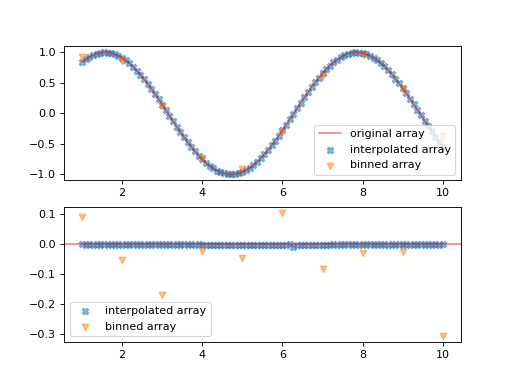
It’s important to notice here that when we perform the binning, we are not simply resampling the input function, but we are using the mean value inside each of the bins.