
Foregrounds#
Defining the foregrounds#
The foregrounds are to be listed in the sky .xml file, along with the source, but under the keyword foregrounds.
<foregrounds>
</foregrounds>
Foregrounds are parsed as optical elements, like the optics in the payload, by ParseOpticalElement.
More foregrounds make an optical path, and therefore are parsed by ParsePath.
<foregrounds>
    <opticalElement> first_foreground_name
    </opticalElement>

    <opticalElement> second_foreground_name
    </opticalElement>
</foregrounds>
By default,`ExoSim`support user defined foregrounds and zodiacal foreground.
User defined foreground#
An example of user defined foreground is reported in the package examples directory:
<foregrounds>
    <opticalElement> earthsky
        <task_model>LoadOpticalElement</task_model>
        <datafile>__ConfigPath__/foreground_file.ecsv</datafile>
        <wavelength_key>Wavelength</wavelength_key>
        <radiance_key>Radiance</radiance_key>
        <efficiency_key>Transmission</efficiency_key>
    </opticalElement>
</foregrounds>
In this case the ExoSim finds a foreground called earthsky, and uses the Task indicated in task_model to load it.
The indicated LoadOpticalElement is the default Task included in ExoSim to load and optical element.
An optical element is defined by it radiance and efficiency in function of the wavelength.
Hence, this default class looks into the indicated datafile to load of the three quantities.
The data file should contain a table such that the three quantities are identified by the keys reported in the .xml description.
In this case the wavelength is reported under a column called Wavelength, the radiance under the column Radiance and the efficiency under the column Transmission.
The user can write a custom Task to load or estimate the foreground differently.
This can be done by writing a new class inheriting from the default LoadOpticalElement
and indicating in the task_model key the python file containing such new class.
The user shall only overwrite the model method in the new class.
The output of a custom model method, as indicated in the LoadOpticalElement documentation,
shall be a Radiance and a Dimensionless.
The first containing the foreground radiance, and the second the foreground transmission.
The two classes should be binned to the general Wavelength grid and Temporal grid.
Notice that the binning can be handled by the spectral_rebin and temporal_rebin methods of the Signal class.
To learn more about customizing tasks, please refer to Custom Tasks.
Caution
If the user doesn’t include the task_model keyword in the optical element description,
the default LoadOpticalElement task is used.
Zodiacal Foreground#
If the foreground name is zodi or zodiacal the code will parse the element using EstimateZodi instead of ParseOpticalElement.
The zodiacal foreground radiance is estimate using a modified version of the JWST-MIRI Zodiacal model (Glasse et al., 2010), scaled according to the target position in the sky and the Zodi model of Kelsall et al. (1998):
where \(BB(\lambda, T)\) is the Planck black body law and \(A\) is the fitted coefficient.
The user can either specify the coefficient to use, as in the example:
<foregrounds>
    <opticalElement> zodiacal
        <zodiacal_factor>2.5</zodiacal_factor>
    </opticalElement>
</foregrounds>
or can specify the coordinates in rad and dec:
<foregrounds>
    <opticalElement> zodiacal
        <coordinates> (ra, dec) </coordinates>
    </opticalElement>
</foregrounds>
In this case the \(A\) coefficient is selected by a precompiled grid. The grid has been estimated by fitting our model with Kelsall et al. (1998) data. A custom map can be provided, to replace the default one, as long as it matches the format, by adding the keyword zodi_map.
Foregrounds propagation#
Each parsed foreground contains a radiance in units of \(W/m^2/\mu m/sr\), which is contained in a Radiance class,
and a transmission, which is contained in a Dimensionless class. Both classes are children of the Signal class.
If more than a foreground is listed, the ParsePath class orders them in the same order used by the user in the .xml file
and it propagates their light top to bottom. So the first element radiance is multiply by the second element transmission, then the second element radiance is summed.
The obtained radiance is then multiply by the third element transmission and the third element radiance is summed to the result.
The final transmission is the product of all the transmission. At the end of the pipeline we have a resulting radiance, still expressed in units of \(W/m^2/\mu m/sr\),
and still contained in a Radiance class, which is the resulting radiance at the end of the chain, and a transmission that is the equivalent transmission of al the chain.
This can be considered as a foreground equivalent to the full foregrounds chain.
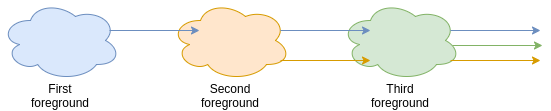
The problem can be express with the recursive equation
Where \(I_{for, i}\) is the radiance of \(i\) foreground and \(\Phi_{for,i}\) is its transmission.
Note
Because of the way the light path is parsed. It’s important to be careful of the order of writing for the optical element. Optical elements further from the detector should be write first in the .xml file.
Following the process presented in Parse from xml, we can parse the foregrounds as
import exosim.tasks.parse as parse

with output.use(append=True, cache=True) as out:

    out_sky = out.create_group('sky')

    parsePath = parse.ParsePath()
    for_contrib = parsePath(parameters=mainConfig['sky']['foregrounds'],
                            wavelength=wl_grid, time=time_grid,
                            output=out_sky,
                            group_name='foregrounds')
In this case, thanks to the group_name keyword, the contribution are saved in a dedicated folder called foregrounds.
The for_contrib element shall be propagated now through the telescope. ExoSim2 handles this as the first optical element of the telescope optical chain.