
Pixels Non-Linearity and saturation#
Pixels Non-Linearity#
The detector’s response to incoming light is not inherently linear. This non-linearity can be modeled as a function of the pixel value.
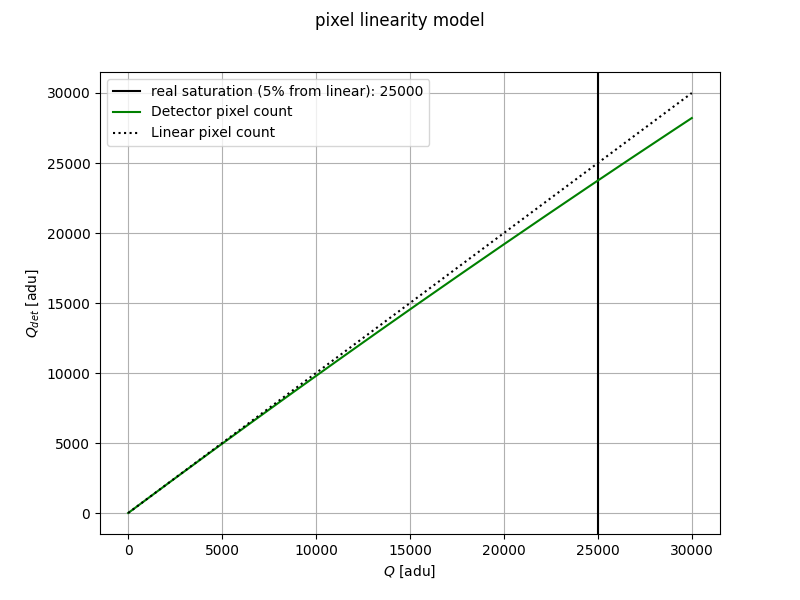
The detector non-linearity model is usually written as a polynomial such as
where \(Q_{det}\) is the charge read by the detector, and \(Q\) is the ideal count, as \(Q = \phi_t\), with \(\phi\) being the number of electrons generated and \(t\) being the elapsed time.
To implement this non-linearity, the ApplyPixelsNonLinearity task is used.
This Task needs as input a map of the coefficients of the polynomial for each pixel.
The task requires a map of polynomial coefficients for each pixel.
You can load this map using the LoadPixelsNonLinearityMap task and specify the file in your configuration..
As usual, the user can replace the default Task with a custom one. In this example, we use the pnl_map.h5 file which is produced using one of the methods described in Pixels Non-Linearity.
<channel> channel
    <detector>
        <pixel_non_linearity> True </pixel_non_linearity>
        <pnl_task> ApplyPixelsNonLinearity </pnl_task>
        <pnl_map_task> LoadPixelsNonLinearityMap </pnl_map_task>
        <pnl_filename>__ConfigPath__/data/payload/pnl_map.h5</pnl_filename>
    <detector>
</channel>
Alternatively, the coefficients map can be provided as a numpy array (see numpy documentation),
and loaded using LoadPixelsNonLinearityMapNumpy:
<channel> channel
    <detector>
        <pixel_non_linearity> True </pixel_non_linearity>
        <pnl_task> ApplyPixelsNonLinearity </pnl_task>
        <pnl_map_task> LoadPixelsNonLinearityMapNumpy </pnl_map_task>
        <pnl_filename>__ConfigPath__/data/payload/pnl_map.npy</pnl_filename>
    <detector>
</channel>
Saturation#
After undergoing non-linear adjustments, a pixel may reach its saturation point, or “full well capacity.”
The ApplySimpleSaturation handles pixel saturation.
It sets the value of each pixel exceeding the full well capacity to the maximum allowable counts.
It needs to know the full well capacity and it can be set and used as
<channel> channel
    <detector>
        <well_depth unit="count"> 100000  </well_depth>
        <saturation> True </saturation>
        <sat_task> ApplySimpleSaturation </sat_task>
    <detector>
</channel>