Estimate apertures#
Once the wavelength table is ready, is it time to estimate the aperture sizes for the photometry.
By default this is handled by EstimateApertures.
This Task has lot of options inside, but is still possible to define a custom task to replace this one.
To develop a custom Task, please refer to Custom Tasks.
The aperture task must be specified under the radiometric keyword:
<channel> channel_name
    <type> photometer </type>

    <radiometric>
        <aperture_photometry>
            <apertures_task> EstimateApertures </apertures_task>
        </aperture_photometry>
        ...
    </radiometric>

</channel>
Inside RadiometricModel this tasks is handled by the compute_apertures method.
To use the default task in a script on a channel, the user can write:
import exosim.tasks.radiometric as radiometric

estimateApertures = radiometric.EstimateApertures()
aperture_table = estimateApertures(table=table,
                                   focal_plane=focal_plane,
                                   description=description['radiometric']['aperture_photometry'],
                                   wl_grid=wl_grid)
Where table is the wavelength radiometric table, focal_plane is the channel source focal plane array, description is the dictionary containing the aperture photometry information from the xml file, and wl_grid is the focal plane wavelength grid.
Caution
If the user doesn’t include the apertures_task keyword in the channel description,
the default EstimateApertures task is used.
To develop a custom Task, please refer to Custom Tasks.
The results of this Task is a QTable with the centers, sizes and shapes of the apertures for the channel.
keyword |
content |
|---|---|
spectral_center |
center of the aperture in the spectral direction |
spectral_size |
size of the aperture in the spectral direction |
spatial_center |
center of the aperture in the spatial direction |
spatial_size |
size of the aperture in the spatial direction |
aperture_shape |
shape of the aperture (rectangular or elliptical) |
In the following we will investigate and discuss the Task options.
Spectral and Spatial modes#
By specifying the spectral and spatial modes, the user can define the way the focal plane data are summed in the two directions. By combining different options the user can have control on the summing method.
Spectral modes#
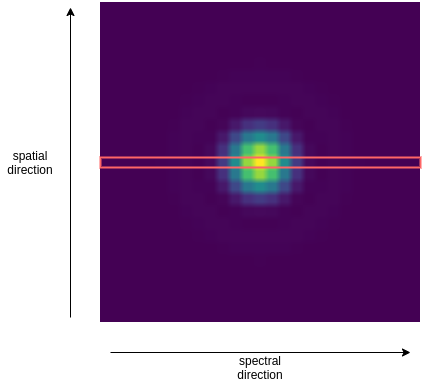
Spectral modes specifies how the detector pixels counts are summed inm the two directions. These, are set with the spectral_mode keyword.
Rows#
By setting the spectral_mode equal to row, the aperture sizes in the spectral direction are set such that the ful pixel row is summed together.
<channel> channel_name
    <type> photometer </type>

    <radiometric>
        <aperture_photometry>
            <apertures_task> EstimateApertures </apertures_task>
            <spectral_mode> row </spectral_mode>
        </aperture_photometry>
        ...
    </radiometric>

</channel>
Wavelength solution#
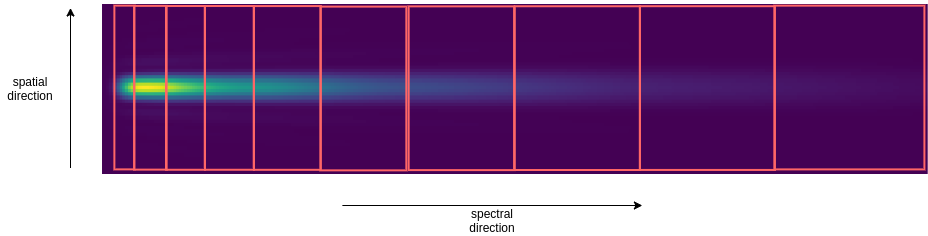
By setting the spectral_mode equal to wl_solution, the aperture sizes in the spectral direction are estimated starting from the spectral bin size defined in the radiometric table (see Wavelength binning).
<channel> channel_name
    <type> spectrometer </type>

    <radiometric>
        <aperture_photometry>
            <apertures_task> EstimateApertures </apertures_task>
            <spectral_mode> wl_solution </spectral_mode>
        </aperture_photometry>
        ...
    </radiometric>

</channel>
Spatial modes#
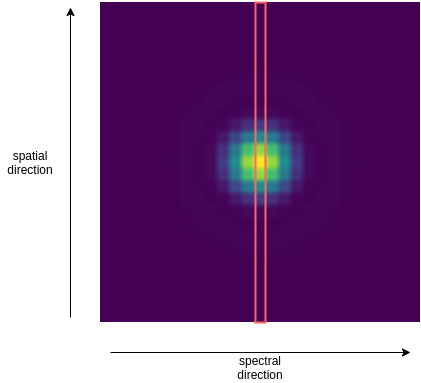
At the moment only a spatial mode is available. By setting the spatial_mode equal to column, the aperture sizes in the spatial direction are set such that the ful pixel column is summed together.
<channel> channel_name
    <type> photometer </type>

    <radiometric>
        <aperture_photometry>
            <apertures_task> EstimateApertures </apertures_task>
            <spatial_mode> column </spatial_mode>
        </aperture_photometry>
        ...
    </radiometric>

</channel>
Use cases example#
To summarise with a couple of examples, if the user wants to read a photometer by summing up all the pixel values, it can either use the automatic mode full (shown later)
<channel> channel_name
    <type> photometer </type>

    <radiometric>
        <aperture_photometry>
            <apertures_task> EstimateApertures </apertures_task>
            <auto_mode> full </auto_mode>
        </aperture_photometry>
        ...
    </radiometric>

</channel>
or can specify the different methods in the two direction and
ask to the EstimateApertures task
to sum all the columns and rows:
<channel> channel_name
    <type> photometer </type>

    <radiometric>
        <aperture_photometry>
            <apertures_task> EstimateApertures </apertures_task>
            <spectral_mode> row </spectral_mode>
            <spatial_mode> column </spatial_mode>
        </aperture_photometry>
        ...
    </radiometric>

</channel>
If the user want to read a spectrometer by summing up all the pixel along the columns of a spectral bin, it can combine the column and wl_solution methods:
<channel> channel_name
    <type> spectrometer </type>

    <radiometric>
        <aperture_photometry>
            <apertures_task> EstimateApertures </apertures_task>
            <spectral_mode> wl_solution </spectral_mode>
            <spatial_mode> column </spatial_mode>
        </aperture_photometry>
        ...
    </radiometric>

</channel>
Automatic modes#
The EstimateApertures task
includes come automatic functionalities aimed to optimise the search for the right aperture.
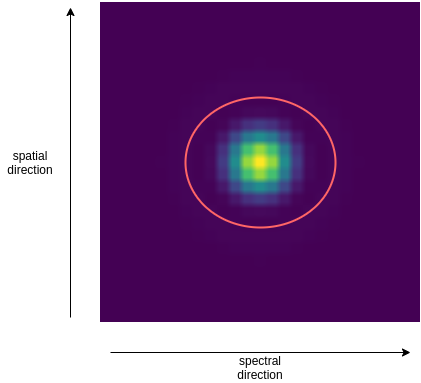
Elliptical apertures#
This mode can be set with auto_mode equal to elliptical.
Using this method the find_elliptical_aperture is run.
The function look for an elliptical aperture on the focal plane which enclose at least
the Encircled Energy specify by the keyword EnE, while minimizing the number of pixel inside in the aperture area.
<channel> channel_name
    <type> photometer </type>

    <radiometric>
        <aperture_photometry>
            <apertures_task> EstimateApertures </apertures_task>
            <auto_mode> elliptical </auto_mode>
            <EnE> 0.91 </EnE>
        </aperture_photometry>
        ...
    </radiometric>

</channel>
Rectangular apertures#
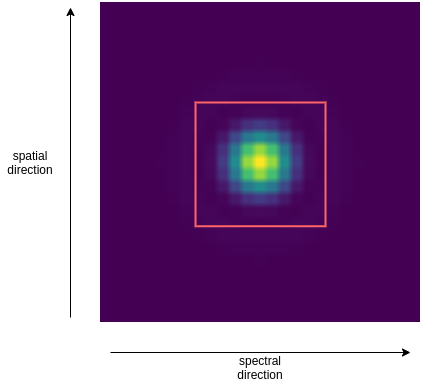
This mode can be set with auto_mode equal to rectangular.
Using this method the find_rectangular_aperture is run.
The function look for a rectangular aperture on the focal plane which enclose at least
the Encircled Energy specify by the keyword EnE, while minimizing the number of pixel inside in the aperture area.
<channel> channel_name
    <type> photometer </type>

    <radiometric>
        <aperture_photometry>
            <apertures_task> EstimateApertures </apertures_task>
            <auto_mode> rectangular </auto_mode>
            <EnE> 0.91 </EnE>
        </aperture_photometry>
        ...
    </radiometric>

</channel>
Spectral bins apertures#
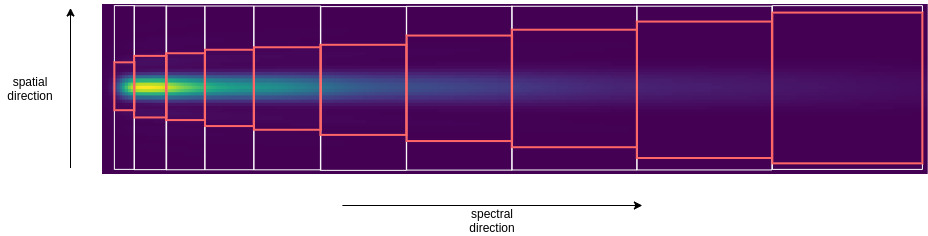
This mode can be set with auto_mode equal to bin.
Using this method the find_bin_aperture is run.
The function look for a rectangular aperture with fixed spectral size on the focal plane which enclose at least
the Encircled Energy specify by the keyword EnE, while minimizing the number of pixel inside in the aperture area.
<channel> channel_name
    <type> spectrometer </type>

    <radiometric>
        <aperture_photometry>
            <apertures_task> EstimateApertures </apertures_task>
            <auto_mode> bin </auto_mode>
            <EnE> 0.91 </EnE>
        </aperture_photometry>
        ...
    </radiometric>

</channel>
Full aperture#
This mode can be set with auto_mode equal to full and create a rectangular aperture of the size of the focal plane.
<channel> channel_name
    <type> photometer </type>

    <radiometric>
        <aperture_photometry>
            <apertures_task> EstimateApertures </apertures_task>
            <auto_mode> full </auto_mode>
        </aperture_photometry>
        ...
    </radiometric>

</channel>