
Radiometric model automatic Recipe#
As for the focal plane recipe described in Focal plane automatic Recipe,
ExoSim include an automatic pipeline also for the radiometric model.
This is under the recipes of ExoSim.
from exosim import recipes
recipes.RadiometricModel(options_file='your_config_file.xml',
                         input_file='output_file.h5')
The RadiometricModel can also be run from console as
exosim-radiometric -c your_config_file.xml -o output_file.h5
or
exosim-radiometric -c your_config_file.xml -o output_file.h5 -P
to also run ExoSim RadiometricPlotter, which is documented in Radiometric Plotter.
The radiometric pipeline stores the product in the output file by default using exosim.recipes.radiometricModel.RadiometricModel.write.
If the output format is the default HDF5, refer to How can I load HDF5 data into my code? in the FAQs section for how to use the data,
and see Load signals and tables in particular to cast the focal plane into a Signal class.
Existing focal plane#
If a focal plane has been computed already and is available as input file, then the working scheme for the recipe is reported in the following figure:
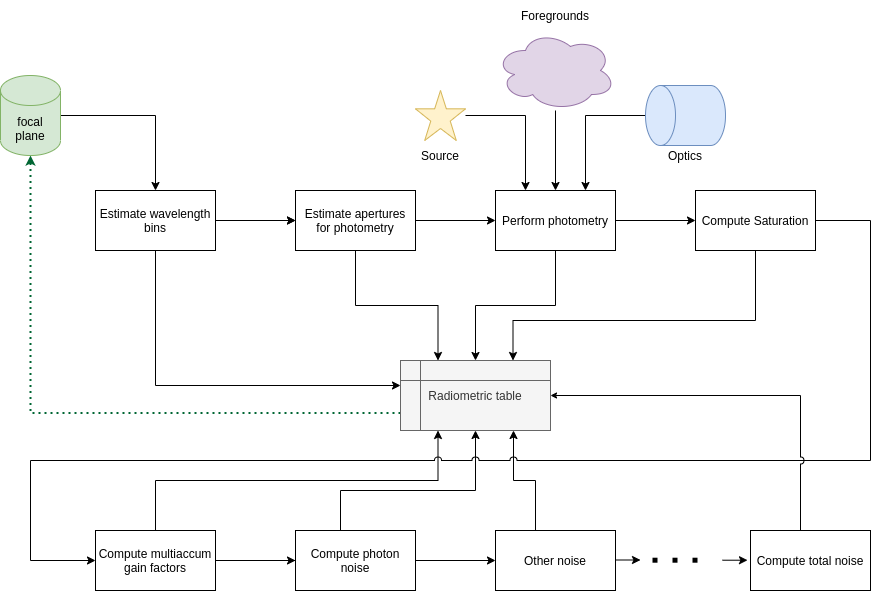
Starting from the focal plane, all the steps are the ones reported previously in this documentation: The involved steps are:
creation of the wavelength table with
create_table(see Wavelength binning);estimation of the apertures sizes and number of pixels involved with
compute_apertures(see Estimate apertures);estimation of the signals in the apertures for the sub foregrounds, if any:
compute_sub_foregrounds_signals(see Estimate signals);estimation of the total foreground signal in the apertures:
compute_foreground_signals(see Estimate signals);estimation of the source focal plane signal in the aperture:
compute_source_signals(see Estimate signals);estimation of the saturation time in the channel:
compute_saturation(see Saturation time);
Then the noise estimation is run:
estimation of the multiaccum factors
compute_multiaccum(see Multiaccum);estimation shot noise
compute_photon_noise(see Photon Noise);update total noise
update_total_noise(see Total Noise)
Then the radiometric table is stored into the input file.
Non existing focal plane#
If a focal plane is not available as input, the RadiometricModel creates it.
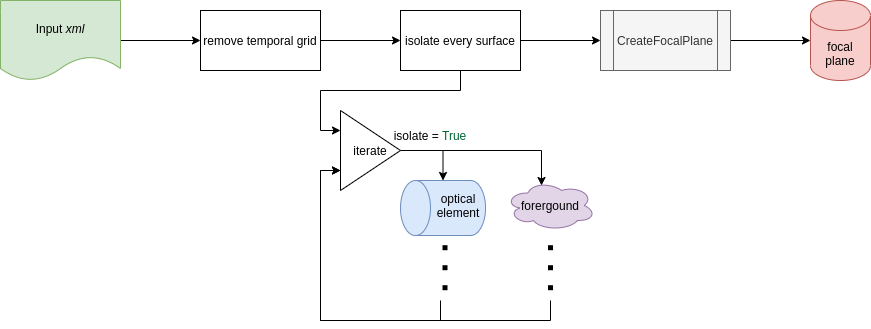
Following the figure, the pipeline first loads the input configuration xml file. Then it removes the temporal dimension, as the radiometric model won’t need it. It isolate every optical element, such that it can estimate their contributions, and finally creates the focal plane using Focal plane automatic Recipe.
Then, from the new focal plane the Existing focal plane pipeline is run.
Radiometric model over a target list#
Not implemented yet