Preparing the Pointing Jitter#
Instrument Pointing Jitter#
First, we need to simulate the instrument pointing jitter. As mentioned in Sub-Exposures, the jitter is sampled to the mid frequencies time scale, so the first step is to define this quantity:
<root>
    <time_grid>
        <start_time unit="hour">0.0</start_time>
        <end_time unit="hour">10.0</end_time>
        <low_frequencies_resolution unit="second">60.0</low_frequencies_resolution>
    </time_grid>
</root>
With this configuration we are simulating 10 hours of observation, with low frequencies variation sampled at 1 minute cadence, and mid frequencies effects sampled at 0.01 seconds cadence.
Then, still in the main configuration file, we need to describe the jitter under the jitter keyword:
<root>
    <jitter>
        ...
    </jitter>
</root>
Here the first key to define is the jitter_task, which specify which jitter Task we want to use.
To learn about how to customised Task, please refer to Custom Tasks.
By default, we use EstimatePointingJitter.
This class randomly build the jitter in the spectral and spatial directions expressed as \(deg\), starting from the input standard deviations:
<jitter>
    <jitter_task> EstimatePointingJitter </jitter_task>
    <spatial unit="arcsec"> 0.2 </spatial>
    <spectral unit="arcsec"> 0.4 </spectral>
    <frequency_resolution unit="Hz"> 100 </frequency_resolution>
</jitter>
Using this configuration the resulting jittered positions will result as:
import exosim.tasks.subexposures as subexposures
estimatePointingJitter = subexposures.EstimatePointingJitter()
jitter_spa, jitter_spe, jitter_time = estimatePointingJitter(parameters=main_parameters)
where main_parameters is the parameter dictionary from the main configuration file.
Note
For long observations with a small low frequiencies variation and high oversampling factor the total RAM memory needed to compute the jitter variation could be very high. It is possible to make this computation, without a large amount of RAM memory, at cost of a larger computation time, switching the slicing parameter in the jitter section, e.g:
<jitter>
    <slicing> True </slicing>
</jitter>
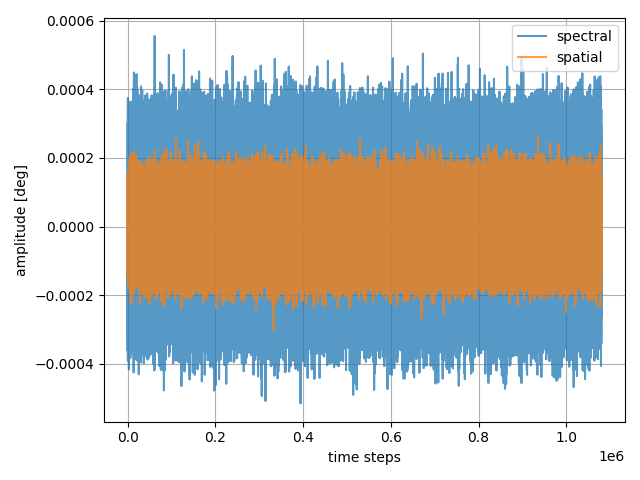
Which are distributed as
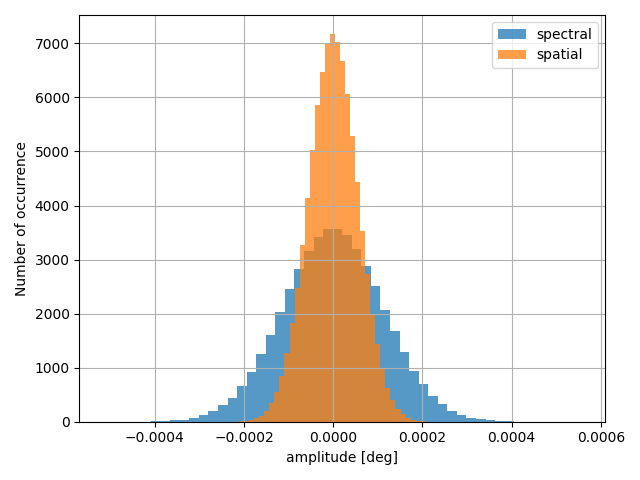
This is the same as run the class with the configuration
Channel Pointing Jitter#
Once the instrument pointing jitter is computed, it is shared between all the channels.
Because each channel has a different plate scale (see also Telescope pointing and multiple sources),
we now need to rescale the pointing jitter to the channel pixel.
This is handled by EstimateChJitter,
which computes the angle of view of each sub-pixel of the focal plane and convert the instrument pointing jitter,
expressed as \(deg\), to units of sub-pixels.
Assuming the instrument jitter has been already computed, and the channels plate scales are in the parameter dictionary
<channel> Photometer
    <type> photometer </type>
    <detector>
        <plate_scale unit="arcsec/micron"> 0.01 </plate_scale>
    <detector>
    <readout>
        <readout_frequency unit="Hz">100</readout_frequency>
    </readout>
</channel>

<channel> Spectrometer
    <type> spectrometer </type>
    <detector>
        <plate_scale>
            <spatial unit="arcsec/micron"> 0.01 </spatial>
            <spectral unit="arcsec/micron"> 0.05 </spectral>
        </plate_scale>
    <detector>
    <readout>
        <readout_frequency unit="Hz">100</readout_frequency>
    </readout>
</channel>
Than EstimateChJitter can be run as
import exosim.tasks.subexposures as subexposures
estimateChJitter = subexposures.EstimateChJitter()
jit_y, jit_x, jit_time = estimateChJitter(parameters = parameters,
                                          pointing_jitter=(jitter_spa,
                                                           jitter_spe,
                                                           jitter_time))
This will results in a list of jitter offsets in pixel units sampled at a multiple of the channel readout_frequency cadence, for the ful length of the observation.
The new jitter time line, jit_time might be different from the previous jitter_time, and different from channel to channel. The new time line is estimated using the lowest multiple shared between the channel readout_frequency and the frequency used to sample the input jitter. This will result in ExoSim oversampling in frequency the detector readout to ensure that the input jitter is well represented and aligned to the detector readout scheme.