
Readout scheme calculator#
Suppose we want to produce the readout scheme below, but we only know a few things about it.
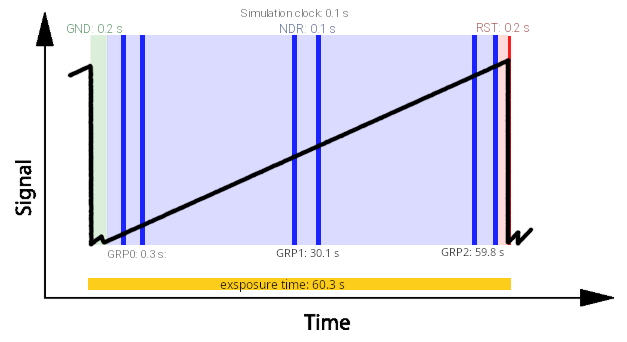
The ramp is sampled at the readout_frequency cadence defined in
Sub-exposures. In this example we want to spend \(0.2 \, s\)
in the ground (GND) state and \(0.2 \, s\) before the reset (RST) state. The
NDRs are read at a constant cadence of \(0.1 \, s\). We then want 3 groups
that split the rest of the ramp into equal parts, each group made of 2 NDRs
separated by the time needed to read one NDR.
To build the scheme we need the time spent between groups, which the figure gives
along the bottom as a time from the start of the simulation. We also need to
convert these human-readable units into the simulation-clock units that
ComputeReadingScheme
expects (see Reading scheme). Finally, we want to use the ramp sampling
well, so we do not want to saturate the detector.
ReadoutSchemeCalculator handles all
of this.
First, translate the known parameters into the channel section of the tool input file:
<channel> channel name
    <readout>
        <n_NRDs_per_group> 2 </n_NRDs_per_group>
        <n_groups>  3 </n_groups>
        <readout_frequency unit ='s'> 0.1 </readout_frequency>
        <Ground_time unit ='s'> 0.2 </Ground_time>
        <Reset_time unit ='s'> 0.2 </Reset_time>
    </readout>
</channel>
The readout_frequency can also be given in \(Hz\) instead of \(s\).
To estimate the saturation time the tool also needs the focal planes. Here we
assume they are stored in input_file.h5:
import exosim.tools as tools

tools.ReadoutSchemeCalculator(options_file='tools_input_example.xml',
                              input_file='input_file.h5')
The tool then prints the inputs to write in the payload configuration file. For this figure, the result is:
<channel> channel name
    <readout>
        <readout_frequency unit="Hz">10</readout_frequency>
        <n_NRDs_per_group> 2 </n_NRDs_per_group>
        <n_groups> 3 </n_groups>
        <n_sim_clocks_Ground> 2 </n_sim_clocks_Ground>
        <n_sim_clocks_first_NDR> 1 </n_sim_clocks_first_NDR>
        <n_sim_clocks_Reset> 2 </n_sim_clocks_Reset>
        <n_sim_clocks_groups> 296 </n_sim_clocks_groups>
    </readout>
</channel>
which gives the following scheme:
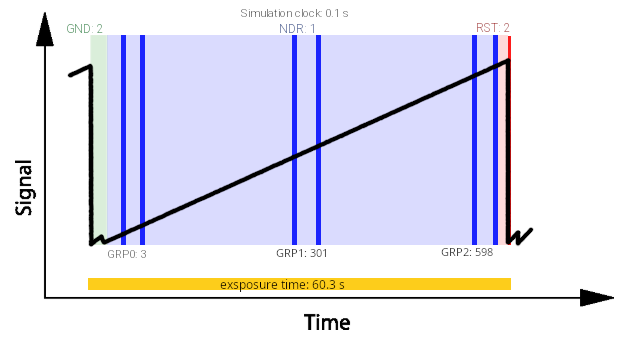
You can also set a custom exposure time to use instead of the saturation time:
<channel> channel name
    <readout>
        <exposure_time unit="s"> 60.3 </exposure_time>
    </readout>
</channel>